 JobNote
Service records the customer can trust
Done on the phone, signed on site, and fixed once they are saved.
- No card needed
- No setup fee
- No contract
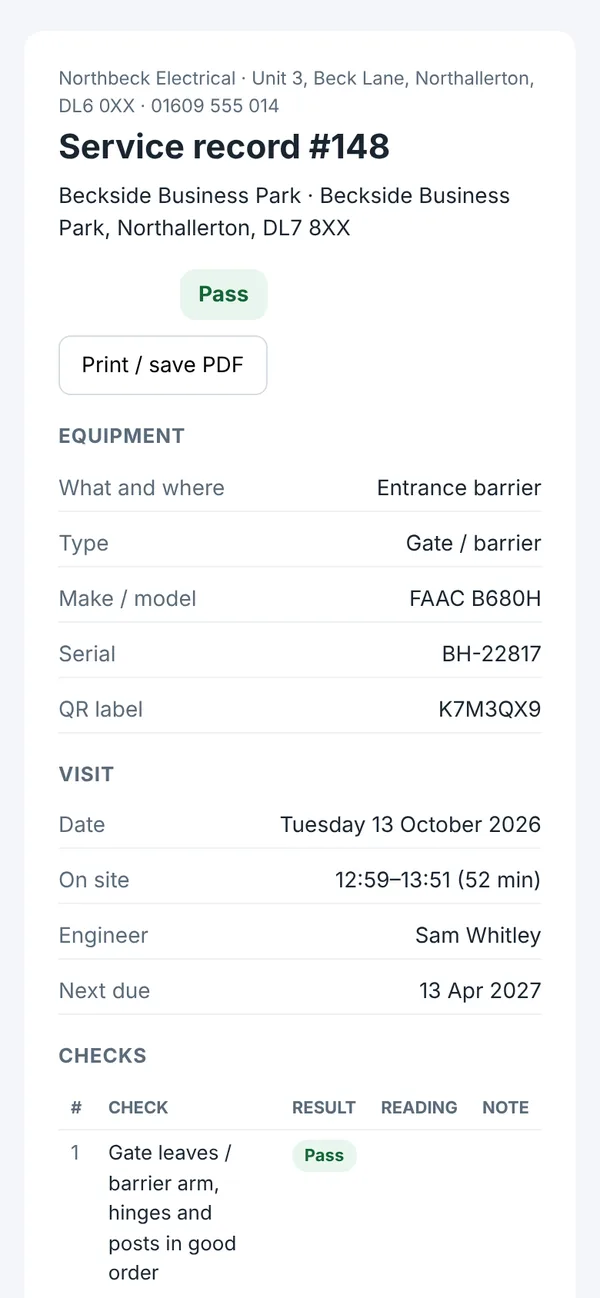
On site
- Choose the visit: service, inspection, repair or call-out.
- A checklist for that type of equipment: pass, fail or N/A, with readings like battery voltage or system pressure.
- Add photos from the camera or the phone's library.
- Pass, pass with advisories, or fail. Anything short of a pass needs a note of what needs doing.
- The customer signs on the screen, or you record why they couldn't.
- Set when the next service is due.
After
- Saved records can't be edited or deleted. That's what makes them worth having. Photos taken on the visit can still follow the record for 14 days.
- Each record has its own link and six-digit PIN to send the customer.
- Customers with a portal login see every record for their equipment.
- The office sees what's due, what's overdue and the full history of every item.
Your own checklists
Each type of equipment starts with a checklist you can change: gates and barriers, fire alarms, emergency lighting, intruder alarms, door access, CCTV, boilers, hot water cylinders, pumps and cess pits, electrical installations, and anything else.
Certificates
A JobNote service record is not a Gas Safe record (CP12), a BS 5839 fire alarm certificate or an Electrical Installation Condition Report, and it says so. Keep doing those in your scheme's own app and attach the PDF to the equipment. Your customer sees it next to the service history. Certificates built into JobNote are on the roadmap.
Try it on your next job
Free for everyone during the beta. Signing up takes a minute: your name, your company, an email and a password.