 JobNote
Quotes they can say yes to. Invoices that match.
From the first visit to getting paid, the numbers carry through.
- No card needed
- No setup fee
- No contract
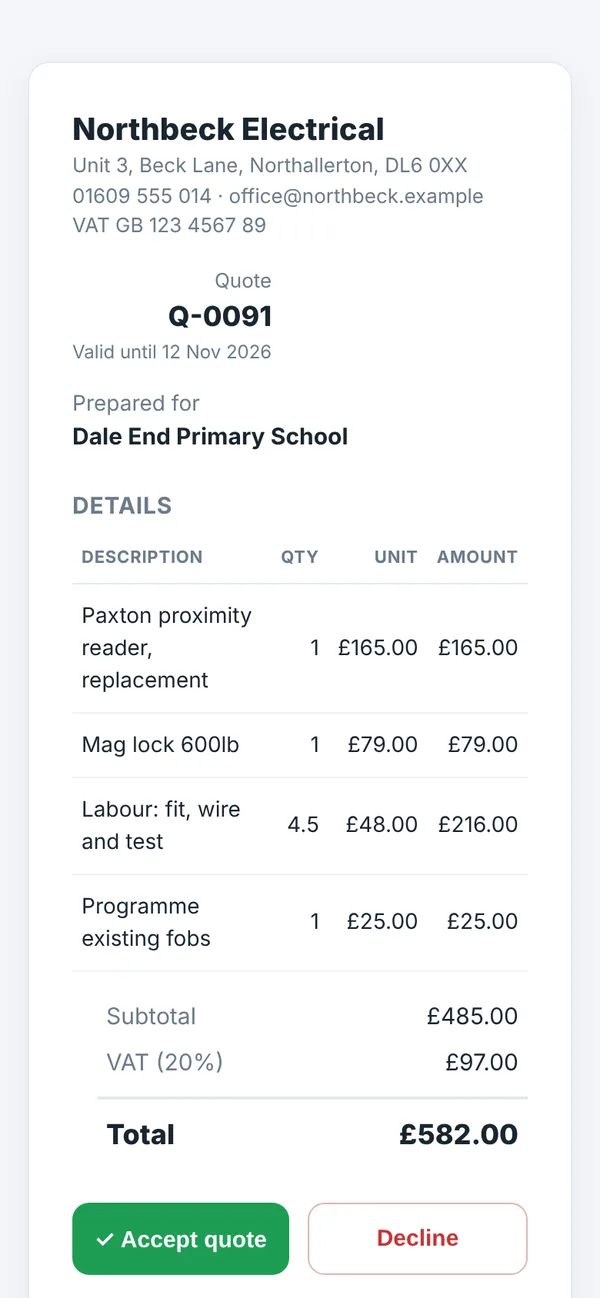
Quotes
- Labour, materials and other lines, from your price list or typed in.
- VAT added if you're registered. Prices are entered without VAT.
- Send the customer a link. They see your company details and can accept or decline.
- An accepted quote becomes a job in one click, with the quoted materials carried over.
- Once sent, a quote can't be quietly changed. Pull it back to edit if you need to.
Invoices
- Raise an invoice from a job: for a quoted job it matches the quote, otherwise it's hours and parts at sell price.
- Or raise one from scratch for any customer.
- Your bank details and the invoice number as the payment reference go on the invoice.
- Send it as a link the customer can print or save as a PDF. Mark it paid when the money's in.
- A job can only be invoiced once, so nothing gets billed twice.
Quoted against booked
On a quoted job, JobNote shows the quote next to the hours and parts booked so far, priced at your rates. It's a quick way to see if a job is running over, and to get your next quote right.
Not built yet
Card payments on invoices and links to Xero, QuickBooks and Sage are on the roadmap.
Try it on your next job
Free for everyone during the beta. Signing up takes a minute: your name, your company, an email and a password.